

Disclosure. VerityLoft may earn a commission if you buy through our links. Neither vendor saw this article before publication, and neither has any say over the scores.
Executive summary
- What’s the difference between Dext and Hubdoc?
- How we tested both
- Does either tool separate different sales taxes on a receipt?
- Head to head: what happened to the difficult documents?
- What does each one cost as you grow?
- Where does each one break?
- Which should you choose?
- People Also Ask
- Sources
- Further reading
- How this article was made
What’s the difference between Dext and Hubdoc?
Dext is a standalone receipt-capture tool sold to practices per client, with a fourteen-day trial and a panel that gives you a tax figure — one figure, not two. Hubdoc, meanwhile, is Xero’s capture tool, bundled with every Xero plan, with a thirty-day trial and a panel that gives you supplier, date, invoice number, total and currency, and no tax at all. If you were choosing on tax handling alone, that difference is smaller than it sounds. However, almost everything else in this comparison is a bigger gap.
On paper they do the same thing. First, your client photographs or emails a receipt; then the tool reads it, and the numbers end up in the ledger. Both connect to QuickBooks Online and Xero. Both notice duplicates. The interesting part, however, is everything that happens between “received” and “in the ledger”, which is where you likely spend your Fridays as a bookkeeper.
We tested both as Cedar and Main Accounting, a fictional two-person practice that keeps its client books in spreadsheets, from a cold sign up with no help from either vendor. In addition, our testing methodology covers how we score and what we refuse to accept from the companies we review.
How we tested both
One session, 12 September 2026, six hours on the clock. Then we uploaded the same fifteen files to each tool in a single batch. Those fifteen came from five source documents, each rendered three ways: a clean control, a “glove box” version that is faded and slightly crooked, and a “phone-quick” version shot off-angle with a shadow across it. As a result, both tools saw the same inputs, so any difference is the software, not the photo.
The five documents:
- A hardware-store e-receipt with two separate sales tax lines — the headline test. We test from British Columbia, so for us that means GST and PST. If you work somewhere with a single tax, read “two lines” as “any tax line”.
- A legal-services invoice, clean, one tax line, the baseline.
- A business credit card statement page with eleven transactions.
- A software subscription refund confirmation, which turned out to be the most revealing file of the lot.
- A handwritten receipt from a second-hand retailer, both taxes written in by hand.
For each file we checked nine fields — supplier, date, subtotal, each tax, total, currency, invoice number, line items — and marked them correct, wrong or missing against an answer key we wrote from the paper before the session started. Five documents is enough to show you where a tool stops reading. However, it is not enough for an accuracy percentage, so you will not find one here.
Does either tool separate different sales taxes on a receipt?
No. Dext reads the tax, but adds the two lines together into one figure. Hubdoc, meanwhile, doesn’t read the tax at all. Either way, the split you need for your return is something you set up in the ledger by rule, not something the software extracts for you.
What each panel showed
Here is what that looked like. The hardware-store receipt shows a subtotal of 84.96 and two tax lines, 4.25 and 5.95. Dext’s panel came back with 10.20 in its tax field, which is the two added together — correct to the cent, but useless for filing. Hubdoc’s panel on the same receipt, by contrast, offers Document Type, Supplier, Invoice/Ref, Date, Due Date, Total Amount and Currency. It got the supplier, the date, 95.16 and CAD right on all three renders. In short, there is simply nowhere on the panel for a tax figure to go.
The third tool did the same thing
It is worth saying that AutoEntry, the third tool we ran in the same session, did exactly what Dext did — one combined figure on every receipt that carried two taxes. So this is not a Dext problem or a Hubdoc problem. As far as we can tell from three tools, capture software treats tax as one number, and therefore, if your clients are in a two-tax jurisdiction, you will be splitting it downstream whichever one you buy.
What that means day to day
In practice, a Dext receipt arrives with a total and a tax figure, and your ledger rule does the split. A Hubdoc receipt, on the other hand, arrives with a total, and you either publish it to Xero and code the tax there or open the image and read it. Neither is what the brochure promised, but one of them gives you a number to work with.
Head to head: what happened to the difficult documents?
Dext reads more, reads it faster, and tells us what it had skipped. Hubdoc, by contrast, reads less, takes longer, and turns two files away without trying. That pattern held across the fifteen renders and the fifty-eight-file degradation ladder on everything except the bank statement, which neither tool handled well.
Speed
Dext accepted fifteen files and had them extracted in 2:02, this was tested September 12, 2026. Hubdoc also accepted the batch in seconds, but then sat on most of it. At ten minutes, therefore, we stopped the clock with documents still processing. If you’re interested in more invoice processing software, AutoEntry landed somewhere between them at 7:05; we cover it in the three-way comparison.
Duplicates
Both tools noticed that three renders of one receipt were the same document. Dext, however, did something about it: the two degraded copies of the hardware-store receipt and the legal invoice were filed as duplicates of the clean one and never extracted. That is four of fifteen files gone from the queue without asking us. Hubdoc, meanwhile, flagged the same files as “Potential Duplicate Document” and processed them anyway. If you work the review queue, Dext’s way saves you time. But if your client photographs a receipt twice because the first shot was blurry, Dext quietly bins the second attempt.
Handwriting
The handwritten receipt is the hardest thing in the set — handwritten line items, both taxes written by hand. Dext read the supplier, the date and the 506.24 total on the clean render and got nothing from either degraded one. Hubdoc, by comparison, got nothing from any of them, clean included; the document sat in its review queue under its own filename with no supplier, no date and no amount. Neither tool told us it had failed. Instead, you would have found out at month end.
Refunds
The subscription document is a refund confirmation, so the right total is −40.63. Dext got the sign on one render out of three, but reported +40.63 on the other two, with no supplier attached. That is the mistake that costs money, because a wrong number with a confident look does not stand out in a list.
Degraded scans
The ladder is fifty-eight files, one parameter at a time at three levels each, run on the hardware-store receipt and the legal invoice. Hubdoc refused two at the door: the receipt rotated fifteen degrees, and the invoice with our “worn wallet” treatment of fade, creases and grain. Everything else, however, it accepted.
What does each one cost as you grow?
Dext charges per client per month, ten clients minimum, with volume discounts it doesn’t publish. Hubdoc, on the other hand, costs nothing on top of Xero, so its real price is whatever Xero plan each client sits on. If your clients aren’t on Xero already, however, Hubdoc isn’t the cheap option — it’s a Xero subscription with capture attached.
Monthly cost at 10, 50 and 200 clients
| Your practice | Dext (Practice Advanced) | Hubdoc |
|---|---|---|
| 10 clients | about US$192 a month | $0 on top of Xero; about US$120 standalone |
| 50 clients | about US$960 a month, before volume discount | $0 on top of Xero; about US$600 standalone |
| 200 clients | about US$3,840 a month, before volume discount | $0 on top of Xero; about US$2,400 standalone |
Where the numbers come from
Dext doesn’t publish its per-client rate. The figures above therefore use the roughly US$19.20 per client that third-party price trackers were reporting in September 2026; the “View plans” screen inside your own Dext account will give you the exact number in your currency. Annual billing also takes 13% off. Xero’s Canadian plans, meanwhile, are CA$25 (Starter), CA$60 (Standard) and CA$80 (Premium) per organization per month as of September 2026, with Hubdoc included on all three. Standalone Hubdoc, for firms not on Xero, has been running about US$12 per organization per month.
Trials
Both trials are card-free. Dext gives you fourteen days on Practice Advanced; Hubdoc gives you thirty on the organisation. What we actually score, however, is the pricing model — per client versus bundled with a ledger — because that’s what behaves differently as you add clients.
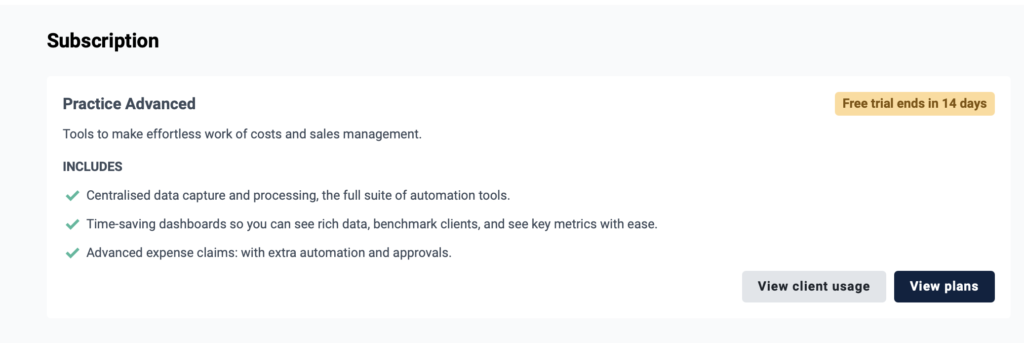
Dext’s Practice Advanced trial card

Hubdoc’s thirty-day trial
Where does each one break?
Dext breaks on duplicates it decides for you and on refunds it reads as purchases. Hubdoc, meanwhile, breaks on tax, on handwriting, on anything crooked, and on time. Neither one handled the bank statement as a statement.
Dext’s duplicate handling is the sharper problem because it is silent. If a client photographs a receipt twice, one copy gets filed and the other gets withheld, and nothing in the queue tells you the second one existed. The refund error, meanwhile, is rarer but worse: two renders out of three turned a credit into an expense.
Hubdoc’s problems are broader but easier to see. First, no tax field means every receipt with tax on it needs you. Second, the two ladder refusals mean a client’s crooked photo is a failed upload rather than a slow one. And finally, the queue we walked away from at ten minutes means “did it go through?” is a question you’ll be asking more often on Hubdoc than on Dext.
Both tools read the statement page as one document with a balance rather than eleven transactions. Dext pulled the 519.71 closing balance on two of three renders with no supplier. So if statements are most of your volume, this isn’t the comparison that answers your question — the three-way comparison is.
Which should you choose?
| Your practice | Pick | Because |
|---|---|---|
| Clients send photos, you want the most read with the least fuss | Dext | Read everything we gave it, fastest of the three, and gives you a tax figure to work with |
| Already paying for Xero, mostly typed invoices | Hubdoc | No extra cost, and typed documents came through correctly |
| Two-tax jurisdiction, hoping the tool splits it | Neither | Dext combines the taxes, Hubdoc ignores them. Set the rule in your ledger and pick on everything else |
| Clients hand you paper from a wallet | Dext, with a re-shoot policy | Hubdoc refused our worn and rotated files; Dext read them or filed them as duplicates |
| Refund-heavy (returns, credit notes) | Neither without a check | Dext got the sign right on one render in three |
| Handwritten receipts are common | Neither | Dext read the clean one only; Hubdoc read none |
Our pick
Dext, unless you’re already on Xero. Not because it solves the tax problem — it doesn’t — but because it reads more, finishes faster, and at least hands you a tax number to build a rule around. If your practice is on Xero with typed suppliers, Hubdoc gets you a working capture tool for nothing, and coding tax on publish is a habit you’ll pick up in a week. If you’re anywhere else, however, you’re paying Dext for the twenty minutes a batch it saves you, and on our numbers that’s a fair trade.
Final scores
Dext: read every document we gave it and finished in about two minutes. Combines your sales taxes into one figure, decides duplicates for you, and misread one refund in three.
VerityLoft tested12 September 2026
Hubdoc: free with Xero and fine on typed invoices. No tax field at all, nothing from handwriting, two files refused, and a processing queue that outlasted our clock.
VerityLoft tested12 September 2026
People Also Ask
Is Hubdoc free with Xero?
Yes, Hubdoc is included with Xero’s Starter, Standard and Premium plans in Canada as of September 2026, as long as it’s connected to the Xero subscription. However, it isn’t free on its own: without Xero you’re paying for Hubdoc as a standalone product.
Does Hubdoc extract sales taxes?
No, the standalone transaction panel we tested on September 12, 2026 carries supplier, date, invoice number, total and currency, and nothing else. Instead, tax gets coded when you publish the document to the ledger, which means by hand or by rule.
Does Dext separate GST and PST?
Not in our test. On a receipt carrying 4.25 of one tax and 5.95 of the other, Dext’s panel showed a single tax figure of 10.20 — the two added together. Instead, you’ll split it with a tax rule in QuickBooks or Xero, the same as you would with any other capture tool we’ve tried.
Does Dext read handwritten receipts?
Partly, on our clean handwritten receipt, Dext read the supplier, date and total; on the same receipt faded or photographed off-angle, however, it returned nothing. Treat handwriting as a manual queue whichever tool you use.
Which is faster, Dext or Hubdoc?
Dext, by a margin that matters. Fifteen files were extracted in about two minutes; Hubdoc, meanwhile, still had documents processing when we stopped the clock at ten. Tested September 12, 2026 one batch, one session.
How much does Dext cost per client?
Dext charges per client per month with a ten-client minimum and doesn’t publish the rate. Third-party trackers, however, put Practice Advanced at roughly US$19 per client in September 2026, with volume discounts above that and 13% off for annual billing. Your in-app plans page shows the exact figure in your currency.
Sources
Everything here was checked in September 2026. Prices and plan terms move, so the vendor pages are the ones to re-read before you buy. The third-party trackers are listed because Dext doesn’t publish its per-client rate, and they are therefore the closest thing to a public number.
- Dext Help Centre, Dext plans for accountants and bookkeepers — plan contents, per-client pricing, ten-client minimum.
- Dext, Pricing plans for accountants and bookkeepers, Canada — annual discount, trial terms, add-on pricing.
- Dext Help Centre, The Cost Inbox — how uploaded documents move through Processing, To Review and Ready.
- Xero, Pricing plans, Canada — Starter, Standard and Premium prices; Hubdoc inclusion.
- CostBench, Dext pricing — third-party per-client figures, verified 23 August 2026.
- bankxlsx, Dext pricing — third-party per-client figures, re-verified 2 September 2026.
- Zerentry, Is Hubdoc still free with Xero? — standalone Hubdoc pricing.
- VerityLoft, Testing methodology — the rubric, weights and session rules used here.
Further reading
If you’re weighing these two, these are the pieces we’d read next, in this order.
- Dext vs Hubdoc vs AutoEntry — the three-way comparison this article sits under, with the full scoring table.
- Dext vs AutoEntry — if per-document pricing is your worry rather than tax handling.
- Hubdoc vs AutoEntry — if you’re on Xero and wondering whether you can leave without losing capture.
- How we test — what six hours on our own card looks like, and what we refuse from vendors.
How this article was made
Tested September 12, 2026 by Ravi Singh on accounts we opened ourselves, as a fictional practice, in a simulated lab session rather than a live client month. Five source documents, fifteen renders, one batch per tool, scored against an answer key we read from the paper first. Scores use VerityLoft’s fixed rubric — Dext 4.1 and Hubdoc 3.5 out of 5 — and, in addition, we didn’t touch the weights for this article. The methodology has the rest.