

The short answer
- Count first: one credit per invoice or receipt, two with line items, two per supplier statement, three per bank statement page.
- Price the month: add up one client’s documents by that schedule, then pick the tier that covers all your clients with room to spare.
- Watch the balance: check it after every batch, keep each file to one folder, and know that a trial stops dead at zero.
Executive summary
- What you need before you start
- Step 1: Open the Credits page and learn the schedule
- Step 2: Count one client’s month and match it to a tier
- Step 3: Keep each file to one folder, and turn line items off where you don’t need them
- How to check it worked
- What goes wrong most often
- People Also Ask
- Sources
- Further reading
- How this article was made
What you need before you start
You need an AutoEntry login with billing rights, one client’s documents for a typical month, and ten minutes. AutoEntry credits are the unit the tool bills in, and every document you upload spends some, so the point of this guide is to know the number before the tool tells you. We learned it the hard way on 12 September 2026, when a trial with twenty-five credits processed twenty-five documents and then locked with four files never reaching the Bills inbox.
- Billing-administrator access, because only that role can buy more credits.
- A month of one real client’s paper: receipts, invoices, and any statements, and a note of how many pages each statement runs to.
- The tier prices in your currency from AutoEntry’s pricing page, which matched the tiers inside our account on the day.
Then work through the three steps below in order, because each one depends on the count from the last.
Step 1: Open the Credits page and learn the schedule
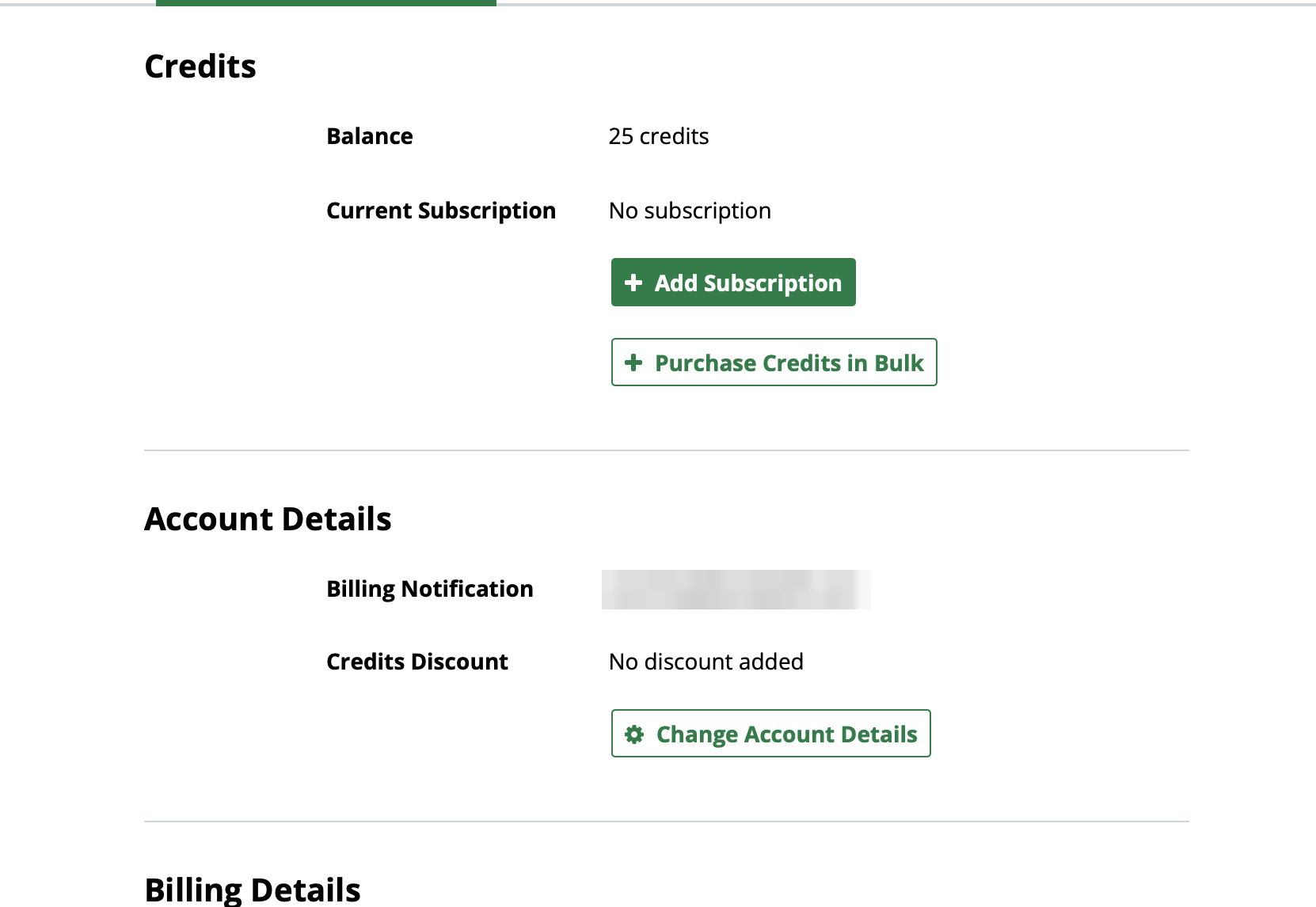
Open the Credits page from your account menu. It shows your balance, your current subscription, and two buttons, Add Subscription and Purchase Credits in Bulk. Ours read twenty-five credits and no subscription at the start of the session, and zero by the end.
The schedule itself lives in the help centre, not on this page, so here it is as AutoEntry published it on 17 September 2026:
| Document | Credits |
|---|---|
| Purchase or sales invoice, or a receipt in Expenses | 1 |
| Invoice with line-item extraction switched on | 2 |
| Supplier statement | 2 |
| Bank or credit card statement | 3 per page |
Two things on that table decide most people’s bills. First, line items double the price of every invoice you switch them on for. Second, AutoEntry prices statements by the page, so a forty-page statement costs 120 credits before you’ve uploaded a single receipt.
Step 2: Count one client’s month and match it to a tier
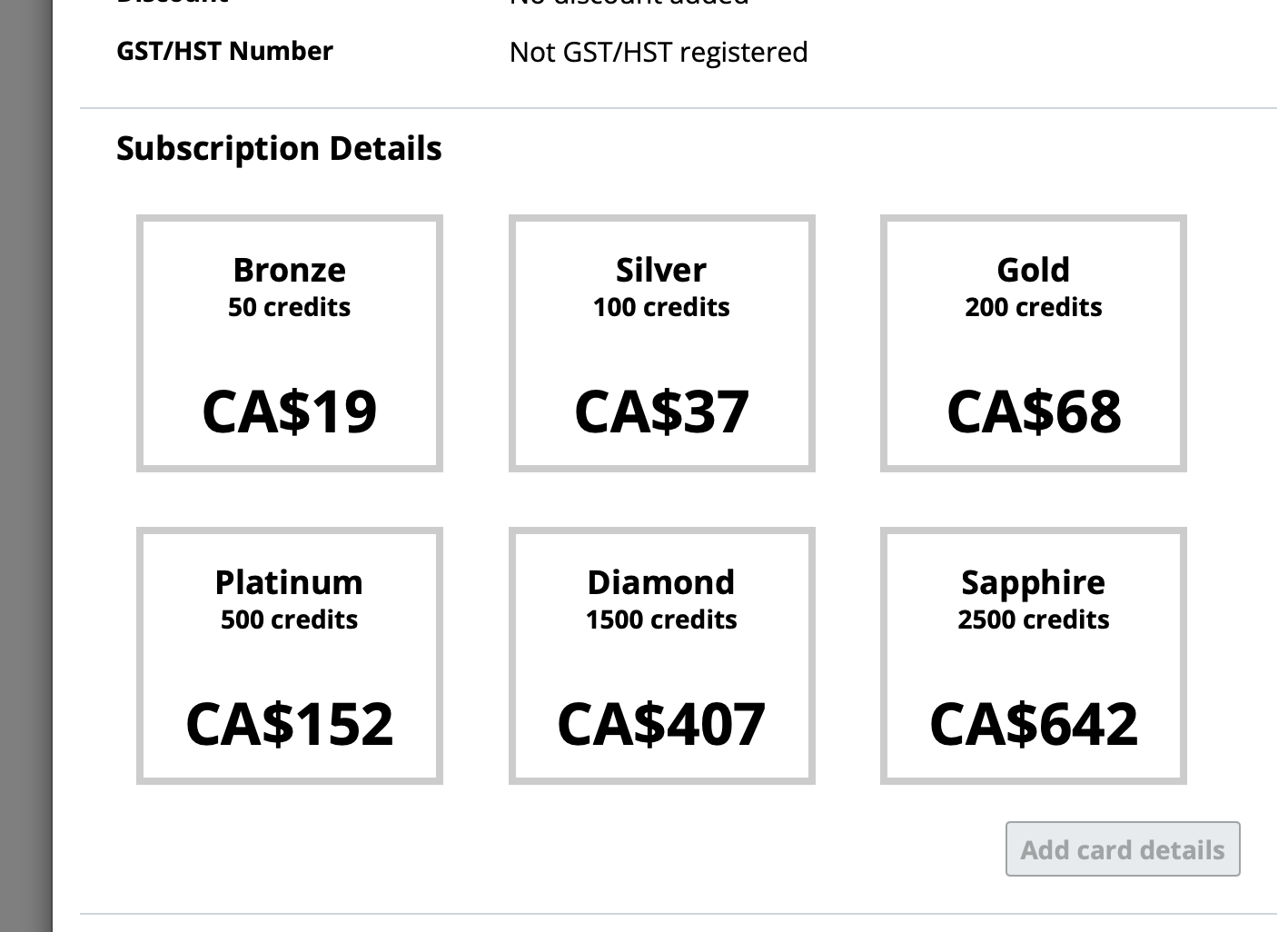
Add up one client’s documents by the schedule, then multiply by your client count and pick the tier above that number. AutoEntry pricing in Canada runs across six monthly tiers, from fifty credits for CA$19 to 2,500 for CA$642, and the per-credit price falls from about 38 cents to about 26 cents as you climb.
Here is the count for an ordinary client:
| One client’s month | Count | Credits |
|---|---|---|
| Receipts and simple invoices | 60 | 60 |
| Invoices with line items on | 10 | 20 |
| Credit card statement | 12 pages | 36 |
| Total | 116 |
So one ordinary client is already past the Silver plan’s hundred, and a firm with ten such clients needs about 1,160 credits a month, which is a Diamond plan at CA$407. If that number surprises you, it is almost always the statement pages. Take them out and the same client is eighty credits.
Unused credits roll over for ninety days, so a quiet month doesn’t waste what you paid for. However, there is no annual option and no annual discount; every tier is monthly, excluding tax.
Step 3: Keep each file to one folder, and turn line items off where you don’t need them
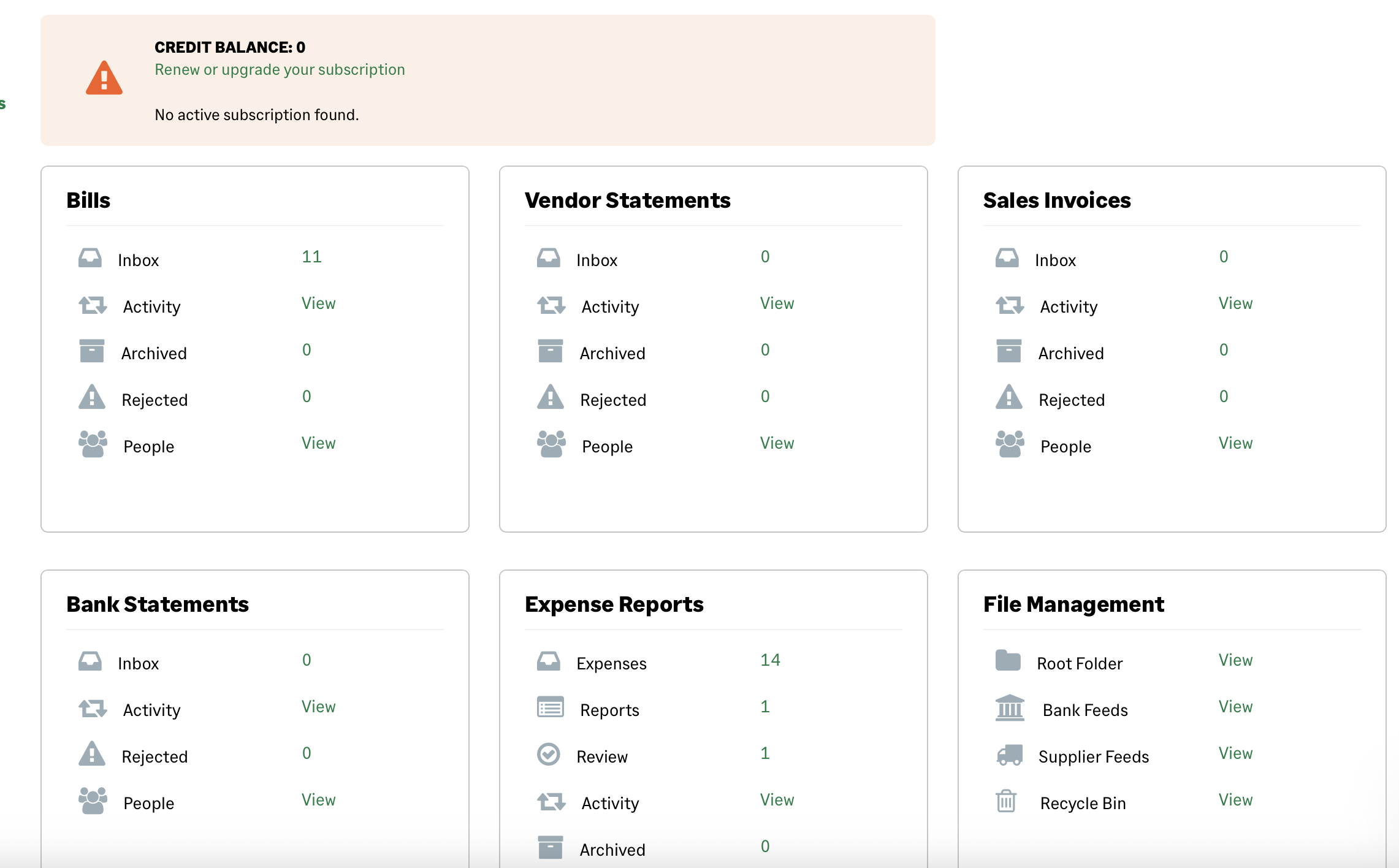
Upload each document once, to one place, and switch line-item extraction on only for the clients who need it. Our fifteen files went into both the Bills inbox and the Expenses module, because a practice testing the product tries both, and the dashboard finished the day showing eleven documents in Bills and fourteen in Expenses. That is twenty-five items, and twenty-five is exactly what a trial gives you.
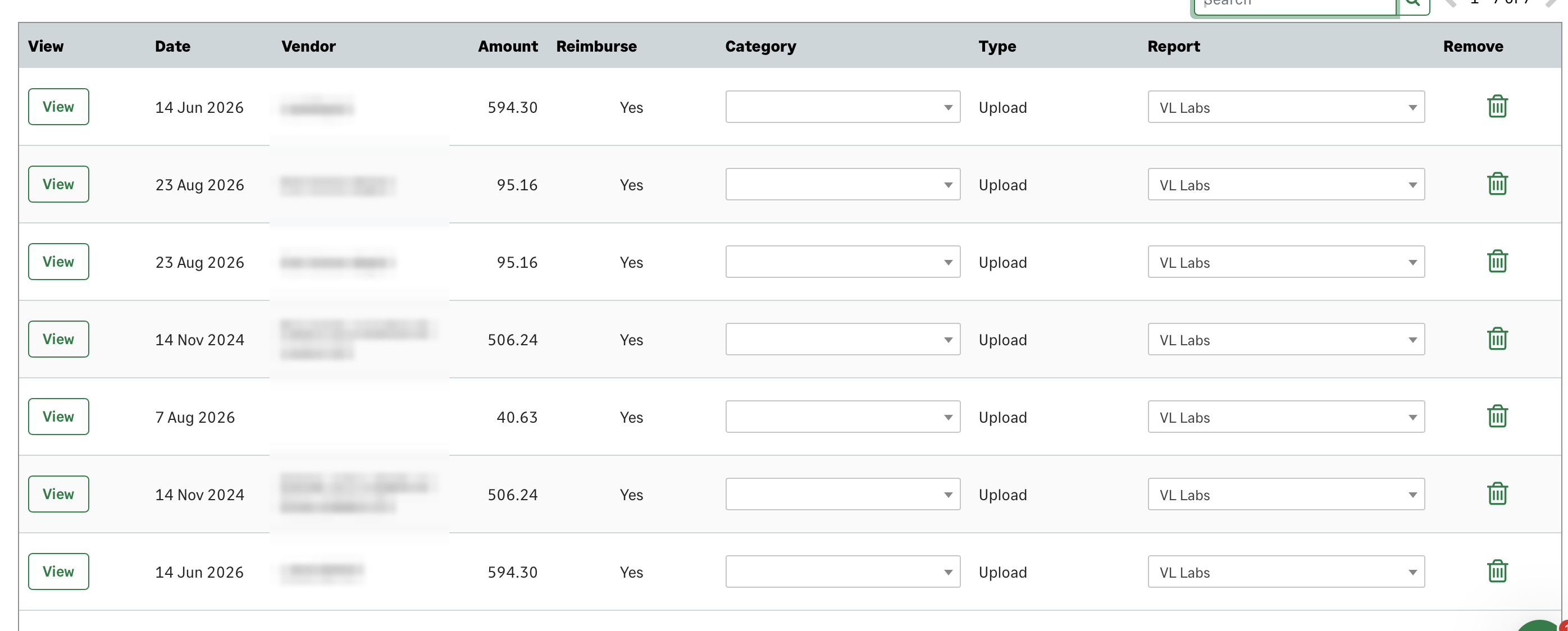
AutoEntry’s help centre is clear about what it will and won’t refund. If AutoEntry catches an identical file at upload, it doesn’t charge you, and you’ll see a “File already uploaded” warning. Click “Process anyway”, though, and it charges you after all. A different photo of a document you’ve already processed only shows up as a duplicate after extraction, and AutoEntry charges for that one. Finally, AutoEntry refunds bank statement pages it flags as duplicates when it rejects the statement. In other words, the tool protects you from the exact same bytes, but not from a second photo of the same receipt.
Line items are the other switch. They cost a second credit on every invoice you enable them for, so leave them off for clients whose ledger only needs the totals.
How to check it worked
After a batch, the Credits page balance should have dropped by exactly the number you counted, and AutoEntry’s Credit Usage report should list the same documents. If the balance dropped further, AutoEntry charged for something twice or a statement had more pages than you thought. Our own check was simple: twenty-five credits in, twenty-five documents out, balance zero.
Then do the same check a week later. Credits expire ninety days after purchase on an active or paused subscription and thirty days after you cancel, so a balance that looks healthy today can be a smaller number next quarter without any uploads at all.
What goes wrong most often
Most people run out because of statement pages they didn’t count, and the second most common reason is processing the same receipt twice. The third is the trial itself. On a paid plan AutoEntry lets you run up to 200% of your monthly allowance into overage and bills it on the next invoice at the pro-rata rate plus ten percent. On a trial, however, there is no overage, and the account stops dead at zero.
That is the wall we hit. Three renders of a handwritten receipt and one refund never reached the Bills inbox, and they didn’t show in Rejected either.
The fix for each is boring. Count statement pages before you upload them, and consider whether the ledger’s bank feed already has those transactions. Keep each file to one folder. And if you’re evaluating on a trial, upload the documents that matter most first, because the files at the back of the queue are the ones you’ll lose.
If you find the counting itself is the problem, the alternative is a tool that prices per client rather than per document, and that trade-off is the whole of our Dext vs AutoEntry comparison.
People Also Ask
These are the questions people ask alongside “AutoEntry credits” and “AutoEntry pricing”. We answer them from AutoEntry’s help centre and pricing page as of 17 September 2026, and from our own batch on 12 September. Re-check the vendor pages before you commit, because the schedule and the tiers change without much notice.
What are AutoEntry credits?
Credits are the unit AutoEntry bills in. Each document you upload spends one or more, on a published schedule: one per invoice or receipt, two with line items, two per supplier statement, and three per bank statement page. You buy them on a monthly tier or in bulk, and unused ones roll over for ninety days.
How many credits does a bank statement use?
Three per page, so a twelve-page statement is thirty-six credits and a forty-page statement is 120. That is more than the Silver plan’s hundred on its own, which is why statement pages are the first thing to count.
Do AutoEntry credits expire?
Yes. Unused credits roll over for ninety days on an active or paused subscription, and for thirty days after you cancel. Trial credits expire after three months. So a quiet quarter is fine, but a quiet half-year is credits you paid for and lost.
What happens if I run out of credits?
On a paid plan you can go into a negative balance of up to 200% of your monthly allowance. AutoEntry bills it on your next invoice at the pro-rata rate plus ten percent, and then the account freezes uploads. On a trial there is no overage. Our account stopped at zero mid-batch, and the first sign was a banner on the dashboard.
Can I buy AutoEntry credits without a subscription?
Yes. The Credits page offers Purchase Credits in Bulk alongside Add Subscription, and bulk credits are available with or without a plan. AutoEntry says they cost slightly more per credit than a subscription, and it doesn’t publish the bulk price list, so the number only appears in your own account.
Is AutoEntry free with Sage?
No. Sage owns AutoEntry, and you’ll often see it listed as AutoEntry by Sage, but Sage sells it on its own credit tiers, separately from its accounting software. The free part is the trial: twenty-five credits, no card, expiring after three months.
Sources
We checked everything here in September 2026. The schedule and the tiers are AutoEntry’s own published figures, and the batch numbers are what we watched happen on our trial account. Re-read the help centre before you rely on a rule, because the June 2026 change to the pause terms shows how quickly they can move.
- AutoEntry, Pricing, fetched 17 September 2026. CAD tiers, monthly-only billing, ninety-day rollover, twenty-five free trial credits.
- AutoEntry Help Centre, AutoEntry credits explained, fetched 17 September 2026. Credits per invoice, per line-item invoice, per supplier statement and per bank statement page.
- AutoEntry Help Centre, Overage, fetched 17 September 2026. The 200% negative balance, the surcharge, and the freeze.
- AutoEntry Help Centre, Are credits deducted from my account for documents uploaded twice in error?, fetched 17 September 2026. Identical files, re-shot documents, and the statement refund.
- AutoEntry Help Centre, Error: “File already uploaded – Process anyway”, fetched 17 September 2026. What the duplicate check covers and when it charges.
- AutoEntry Help Centre, Add more AutoEntry credits, fetched 17 September 2026. Subscriptions, bulk purchases, and who can buy.
- AutoEntry Help Centre, Cancel your subscription and Pause your subscription, fetched 17 September 2026. Expiry after cancellation, expiry while paused, and the June 2026 change.
- AutoEntry Help Centre, Sign up for AutoEntry free trial, fetched 17 September 2026. Twenty-five credits, three-month expiry, no card.
- VerityLoft, Testing methodology. The session rules behind the batch numbers.
Further reading
If you’re pricing AutoEntry against something else, these are the pieces we’d read next, in this order.
- Dext vs AutoEntry, per-client pricing against per-credit pricing on the same five documents.
- Hubdoc vs AutoEntry, if the tool you’re comparing it with is the one that comes free with Xero.
- Dext vs Hubdoc vs AutoEntry, the three-way comparison this guide sits under, with the full scoring table.
- How we test, what six hours on our own accounts looks like, and what we refuse from vendors.
How this article was made
Ravi Singh tested this on 12 September 2026, on a trial account we opened ourselves, as a fictional practice, in a simulated lab session rather than a live client month. The credit schedule and the tier prices are AutoEntry’s own, and we checked them on 17 September 2026. The batch numbers are what the dashboard showed us. The methodology has the rest.